
Miramar, FL · Broward County
Affidavit of Identical Documents for Digital Submittal
Architect or engineer certification that electronic plan files match the hardcopy originals submitted to the building department for permitting.
- Florida-licensed notary
- ~15 min average
- Notarized PDF emailed
What you’ll need
- Government-issued photo ID
- Webcam-enabled device (laptop or phone)
- This form, ready to upload as a PDF
What this form is
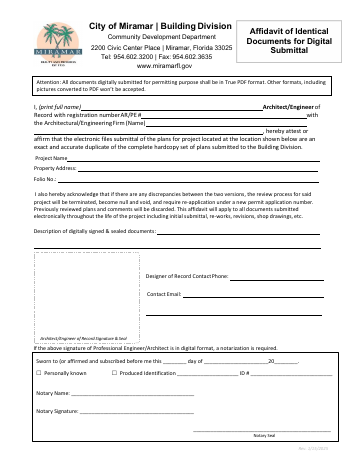
This affidavit confirms that digital versions of construction plans submitted electronically to the Building Division are exact duplicates of the hardcopy set on file. The architect or engineer of record must attest to the accuracy and completeness of all electronic documents throughout the project lifecycle, including initial submittals, revisions, and shop drawings. Any discrepancies between digital and hardcopy versions will void the review and require resubmission under a new permit number.
Who needs it
Architects and professional engineers submitting digital plan sets with digital signatures to support permit applications and project reviews.
Why it needs a notary
Notarization is required when the architect or engineer uses a digital signature on this affidavit, as the notary verifies the professional's identity and sworn attestation of document authenticity.
How to get this notarized
- 1
Prepare Your Affidavit
Ensure your Affidavit of Identical Documents for Digital Submittal is fully completed by the architect or engineer, but do not sign it yet.
- 2
Gather Your Identification
Bring a valid, government-issued photo ID (e.g., driver's license, passport) that matches the name on the affidavit, as required for notary verification.
- 3
Schedule Notary Appointment
Contact City Notary to schedule a convenient time and location for your notarization in Miramar.
- 4
Meet Your Notary
Present your unsigned affidavit and identification to the notary. You will sign the document in the notary's presence.
- 5
Receive Notarized Affidavit
The notary will then complete the notarization, apply their official seal, and return the legally certified affidavit to you for submittal to the City of Miramar.
Preview the form
The blank PDF straight from Miramar. Look it over, then upload your filled copy to start the notary session.

You’ll need ID and a webcam.
A licensed Florida online notary will join you on video, verify your government-issued ID, witness your signature, and apply their seal. You’ll receive the notarized PDF by email when the session ends.
Frequently asked questions
- What is an Affidavit of Identical Documents for Digital Submittal?
- This affidavit is a certification by an architect or engineer stating that the digital construction plan files submitted to the City of Miramar's Building Division are identical to the original hardcopy plans. It ensures consistency between physical and electronic records during the permitting process.
- How do I get my Affidavit of Identical Documents notarized in Miramar?
- You can get your affidavit notarized by scheduling an appointment with City Notary. We will verify your identity, witness your signature, and apply our notary seal to confirm your sworn attestation that digital and hardcopy documents are identical.
- Do I need notarization if I'm using a digital signature on my affidavit?
- Yes, notarization is still required even with a digital signature. The notary's role is to verify the professional's identity and confirm the sworn attestation regarding the authenticity and identical nature of the documents, adding a layer of legal validity.
- What happens if there are discrepancies between digital and hardcopy plans?
- If discrepancies are found between the digital and hardcopy versions of the plans, the review process may be voided, and you might be required to resubmit under a new permit number, causing significant delays.