
Doral, FL · Miami-Dade County
Affidavit Authorizing Scanned Plans and Construction Documents
An affidavit allowing design professionals to submit scanned plans instead of original signed and sealed digital sets during the COVID-19 emergency period.
- Florida-licensed notary
- ~15 min average
- Notarized PDF emailed
What you’ll need
- Government-issued photo ID
- Webcam-enabled device (laptop or phone)
- This form, ready to upload as a PDF
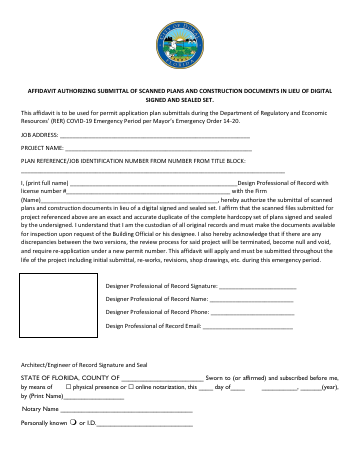
What this form is
This affidavit authorizes the submittal of scanned copies of construction plans and documents in lieu of a complete digital signed and sealed set, issued under the city's COVID-19 emergency provisions. The design professional of record certifies that scanned files are exact duplicates of the original hardcopy plans and acknowledges responsibility for maintaining original records. The affidavit applies throughout the project lifecycle, including initial submittals, revisions, and shop drawings.
Who needs it
Architects, engineers, and design professionals of record submitting construction plans for permit applications during the COVID-19 emergency period.
Why it needs a notary
This affidavit requires notarization because it is a sworn statement by the design professional certifying the accuracy and authenticity of scanned plan submissions in place of original sealed documents.
How to get this notarized
- 1
Step 1
Download the Affidavit for Scanned Plans and Construction Documents from the City of Doral's official website.
- 2
Step 2
Complete the affidavit form with all required project and design professional information.
- 3
Step 3
Contact City Notary to schedule a convenient notarization appointment in Doral.
- 4
Step 4
Present your valid government-issued photo identification to the notary.
- 5
Step 5
Sign the affidavit in the presence of the notary public.
- 6
Step 6
Receive the notarized affidavit, ready for submission to the City of Doral.
Preview the form
The blank PDF straight from Doral. Look it over, then upload your filled copy to start the notary session.

You’ll need ID and a webcam.
A licensed Florida online notary will join you on video, verify your government-issued ID, witness your signature, and apply their seal. You’ll receive the notarized PDF by email when the session ends.
Frequently asked questions
- What is the Affidavit Authorizing Scanned Plans and Construction Documents?
- This affidavit is a sworn statement by a design professional certifying that scanned construction plans and documents submitted to the City of Doral are exact duplicates of the original signed and sealed hardcopy plans. It's used during specific emergency periods, such as the COVID-19 pandemic, to facilitate electronic submissions.
- Do I need notarization for the Doral Affidavit Authorizing Scanned Plans?
- Yes, notarization is required for this affidavit. As a legal document affirming the authenticity of submitted scanned plans, it must be signed under oath in the presence of a notary public to be valid for city submissions in Doral.
- How do I get my Scanned Plans Affidavit notarized in Doral?
- You can get your Scanned Plans Affidavit notarized in Doral by scheduling an appointment with a local mobile notary service like City Notary. Prepare your unsigned affidavit and a valid ID, and the notary will come to your location to witness your signature and affix their seal.