
North Bay Village, FL · Miami-Dade County
Change of Contractor
A permit transfer form allowing property owners to cancel an existing construction permit and authorize a new contractor or proceed as owner-builder.
- Florida-licensed notary
- ~15 min average
- Notarized PDF emailed
What you’ll need
- Government-issued photo ID
- Webcam-enabled device (laptop or phone)
- This form, ready to upload as a PDF
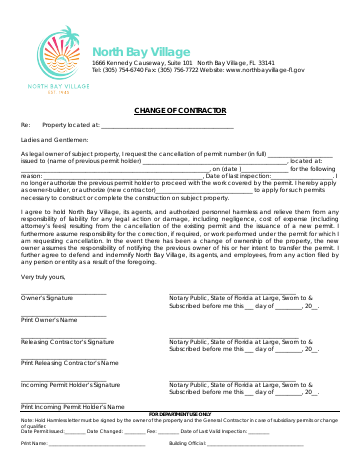
What this form is
This form allows a property owner to cancel an active construction permit held by one contractor and transfer it to a new contractor or themselves as owner-builder. The document establishes that the original permit holder is no longer authorized to work on the project and that the owner assumes responsibility for any corrections needed on prior work. The form includes indemnification language protecting the municipality from liability disputes.
Who needs it
Property owners who need to switch contractors mid-project or take over construction work as owner-builders themselves.
Why it needs a notary
All signatures—owner, releasing contractor, and incoming permit holder—must be notarized to authenticate the permit holder change and the owner's release of the previous contractor.
How to get this notarized
- 1
Step 1
Download the 'Change of Contractor' form from the North Bay Village building department website.
- 2
Step 2
Complete all required sections, including owner information, details of the original contractor, and information for the new contractor or owner-builder.
- 3
Step 3
Ensure all parties who need to sign the form (property owner, releasing contractor, new contractor/owner-builder) are available.
- 4
Step 4
Schedule an appointment with City Notary, ensuring all signers have valid government-issued identification.
- 5
Step 5
Meet with the notary public to have all signatures witnessed and the form officially notarized.
- 6
Step 6
Submit the fully notarized 'Change of Contractor' form to North Bay Village's building division to finalize the permit update.
Preview the form
The blank PDF straight from North Bay Village. Look it over, then upload your filled copy to start the notary session.

You’ll need ID and a webcam.
A licensed Florida online notary will join you on video, verify your government-issued ID, witness your signature, and apply their seal. You’ll receive the notarized PDF by email when the session ends.
Frequently asked questions
- What is a Change of Contractor form in North Bay Village?
- This form officially allows a property owner to discontinue a construction permit with an existing contractor and either assign a new contractor or elect to proceed as an owner-builder for projects in North Bay Village.
- Do I need to notarize a Change of Contractor form for North Bay Village?
- Yes, all signatures involved—the property owner, the releasing contractor, and the incoming permit holder (new contractor or owner-builder)—must be notarized to legally validate the permit transfer and protect all parties.
- How do I get a Change of Contractor form notarized in North Bay Village?
- Gather all signers (owner, releasing contractor, new contractor/owner-builder) and their valid IDs. Contact City Notary to schedule a convenient appointment in North Bay Village for prompt and accurate notarization of your form.
- What happens after the Change of Contractor form is notarized?
- Once notarized, the completed form can be submitted to the North Bay Village building department to officially update your construction permit and authorize the new permit holder to continue the project.